
8 Tbps Advanced & Automatic DDoS Protection

Secure, DDoS-protected floating IPs with automatic attack detection, capable of mitigating attacks of up to 8Tbps! Create whitelists, blacklists and geographically restrict IPs for maximum flexibility and security.

€10.00 per Floating IP/m.Layers 3-799.5% SLA8Tbps+ Filtering CapacityLocated In Europe24/7 Support10 Gb/s Network

What Is A DDoS Attack & What Does It Do?

A DDoS (Distributed Denial of Service) attack is any malicious attempt to fully or partially impair the service or the access to your server. Most of the attacks are high in volume, requiring a massive bandwidth capacity and special hardware firewalls for their filtration. If a virtual server is not protected, even small DDoS attacks can render it unavailable, which is why having DDoS protection is essential.

Learn More About DDoS Attacks

Our Powerful & Secure DDoS Protection

Our DDoS protection is designed to automatically detect, filter and mitigate high volumetric attacks ensuring that your services remain online at all times.

€10.00 per Floating IP/m.

Types Of DDoS Attacks

Protect your cloud server against attacks targeting Layers 3, 4 and 7, including SYN floods, UDP floods, ICMP floods, amplification attacks, reflection attacks and application-layer floods. All traffic is constantly analyzed and filtered before reaching your infrastructure.

Global Scrubbing Network

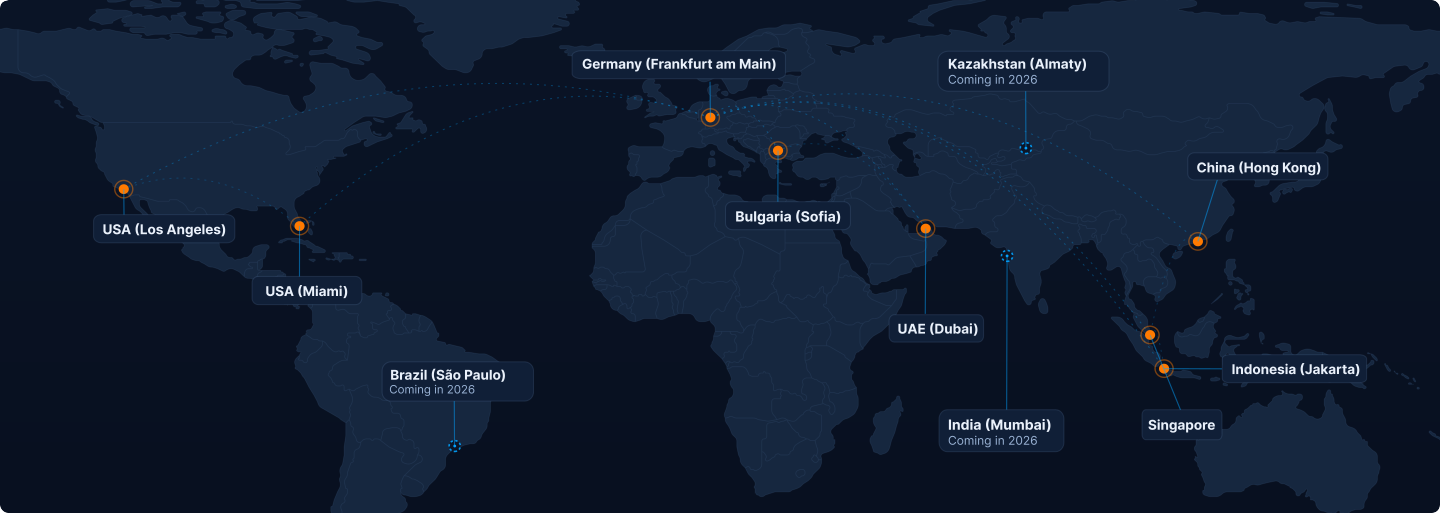
Our DDoS protection has 8 different PoPs globally, ensuring that malicious traffic is routed and attacks are mitigated closer to their origin.

World map of the VPSBG global DDoS scrubbing network points of presence

How Traffic Is Filtered

See how your server's inbound traffic is primarily cleaned in these 3 stages.

  1. Edge Routers

    Over 100 border routers globally block malicious traffic, protecting your network from attacks of up to 8Tbps by filtering TCP/UDP amplifications.

  2. Initialization

    TCP/UDP flood traffic is blocked, which results in higher packet processing speeds. Because of this, the load is distributed evenly between a number of hardware filters.

  3. Precision Filters

    Attacks are constantly evolving and so are we. This is why at this level we block even the most advanced threats, which includes bots.

Complete Visibility & Control

Manage your DDoS-protected floating IPs through an intuitive control panel that features real-time attack monitoring, analytics, access controls and blocked IPs.

Traffic Monitoring

Monitor the health and status of your DDoS-protected IPs in real time. View incoming traffic, bandwidth utilization, mitigation activity and protection status with the help of a centralized dashboard, designed to provide visibility for your network traffic.

Attack History

Get access to detailed records of previous attacks, including duration, peak traffic volume, vectors and mitigation results. These reports help identify recurring threats and provide valuable information about your infrastructure's security over time.

Access Lists

Take control over who can access your services using custom whitelists and blacklists as well as geographic filtering rules. Restrict access by individual IP addresses, IP ranges or entire countries to improve security and reduce unwanted traffic.

Blocked IPs

Review all traffic sources that were automatically identified and blocked by our protection. Inspect blocked addresses, analyze suspicious activity and maintain visibility into malicious traffic targeting your protected services.

How To Manage A DDoS-Protected Floating IP

Deploy, attach and set up additional access lists for your DDoS protection with just a few clicks from the VPSBG Console.

How To Order A DDoS-Protected Floating IP

To activate DDoS protection for your server, all you need to do is to simply purchase a DDoS-protected floating IP from the VPSBG Console and attach it to your server. Once attached, you can manually tailor different traffic rules and protection options.

Order DDoS-Protected Floating IP

How To Attach A DDoS-Protected Floating IP

Once you have purchased a DDoS-protected floating IP, simply click on the attach button and select the server that you wish to protect. You can also do this from the Networking tab on your server's management page.

Attach DDoS-Protected IP

DDoS Protection FAQ

Find the answer to the most popular questions about our DDoS-protected floating IPs.

Stay Online During Every Attack

Protect your infrastructure with our high-volumetric DDoS Protection! Real-time attack visibility and advanced traffic controls designed to keep your services available when it matters most.