NewExtra server protection with Measured Boot & UKI images.View Measured Boot
BlogDocumentationFAQNo Third-Party CookiesContact Us
  • Pricing
Log inSign up
Cloud VPSVDSMemory-Optimized VDSStorage-Optimized VDSWindows VPSBitcoin VPSDDoS ProtectionPrivate Networking (VPC)Floating IPsAdditional Server SupportMicrosoft LicensesDatacenterNetworkDocumentationFAQNo Third-Party CookiesConfidential ComputingSelf-Hosted VPNBlogAboutBrand GuidelinesAffiliatesContact UsLegal & Compliance

Products

  • Pricing
  • Cloud VPS
  • VDS
  • RAM-Optimized VDS
  • Storage-Optimized VDS
  • Windows VPS
  • Bitcoin VPS
  • DDoS Protection
  • Private Networking (VPC)
  • Floating IPs
  • Microsoft Licenses
  • Additional Server Support

Explore

  • Documentation
  • Developers API Docs
  • FAQ
  • Datacenter
  • Network
  • Looking Glass
  • Confidential Computing
  • Cookie Policy
  • Self-Hosted VPN

Company

  • Blog
  • Contact Us
  • About Us
  • Brand Guidelines
  • Affiliates

Legal & Compliance

  • Terms of Service
  • Privacy Policy
  • Data Processing Agreement
  • Acceptable Use Policy
  • Microsoft Software Terms of Use
  • Refund Policy
  • Report Abuse

Products

  • Cloud VPS
  • VDS
  • RAM-Optimized VDS
  • Storage-Optimized VDS
  • Windows VPS
  • Bitcoin VPS
  • DDoS Protection
  • Private Networking (VPC)
  • Floating IPs
  • Microsoft Licenses
  • Additional Server Support
Pricing

Explore

  • Documentation
  • Developers API Docs
  • FAQ
  • Datacenter
  • Network
  • Looking Glass
  • Confidential Computing
  • Cookie Policy
  • Self-Hosted VPN

Company

  • Blog
  • Contact Us
  • About Us
  • Brand Guidelines
  • Affiliates

Legal & Compliance

  • Terms of Service
  • Privacy Policy
  • Data Processing Agreement
  • Acceptable Use Policy
  • Microsoft Software Terms of Use
  • Refund Policy
  • Report Abuse

© VPS.BG Ltd. 2026 · All rights reserved!

Made with passion in Bulgaria · VAT ID: BG203144520

Contents

  • How does the auto-renew feature work?
  • How to disable or re-enable balance auto-renew for your services
  • How to automatically renew your services by card

Subscribe to Our Newsletter

Join 5000+ subscribers and receive helpful content, deals and more! We promise no spam - 100% great content. Unsubscribe anytime.

Share Article

#VPSBG
  1. Documentation
  2. /
  3. #VPSBG
  4. /
  5. How to activate auto-renew for your services

How to activate auto-renew for your services

Published: 16 January 2020 • Updated: 02 October 2025 • 3 min read

#Tutorial#VPSBG

Auto-renew is a functionality that allows you - our customers, to utilize an automatic charge option, meaning that your services will be automatically renewed when they start to expire using the money that you have previously deposited into your balance.

Additionally, you can also add and save your card details, which can charge your card automatically every month.

How does the auto-renew feature work?

With the auto-renews feature, a special order will be created automatically 14 days before the expiration date of your service. This order is generated for each individual service. The system will automatically charge your balance, if you have the required amount present. In cases where you have the necessary funds, they will be automatically deducted and your service - renewed.

On the other hand, if you do not have the needed amount, you will be emailed with a notification stating that you have insufficient funds in your account balance and you will be required to manually renew the given service(s). This feature allows you to deposit as much money as you would like into your account so that you will not have to worry about having to manually pay for your services each month.

How to disable or re-enable balance auto-renew for your services

Firstly, log into your account, which will take you to the Console. Next, simply navigate to the 'Billing' tab from the menu on the left or use the 'Add Funds' button which can be found on top:
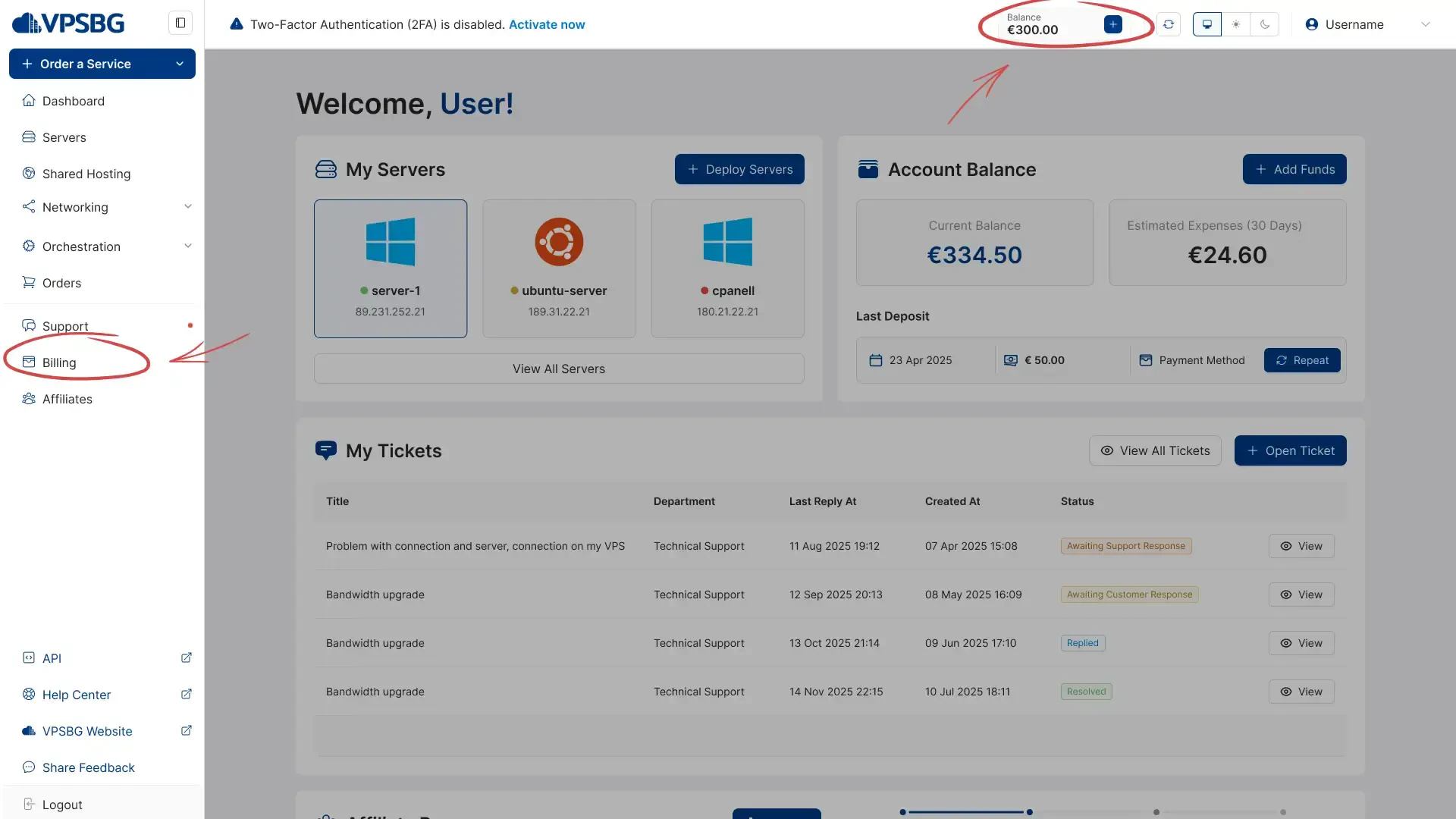
add funds

In order to deactivate or re-enable the feature, click on the toggle button in the 'Auto-renew' section as illustrated in the following image:
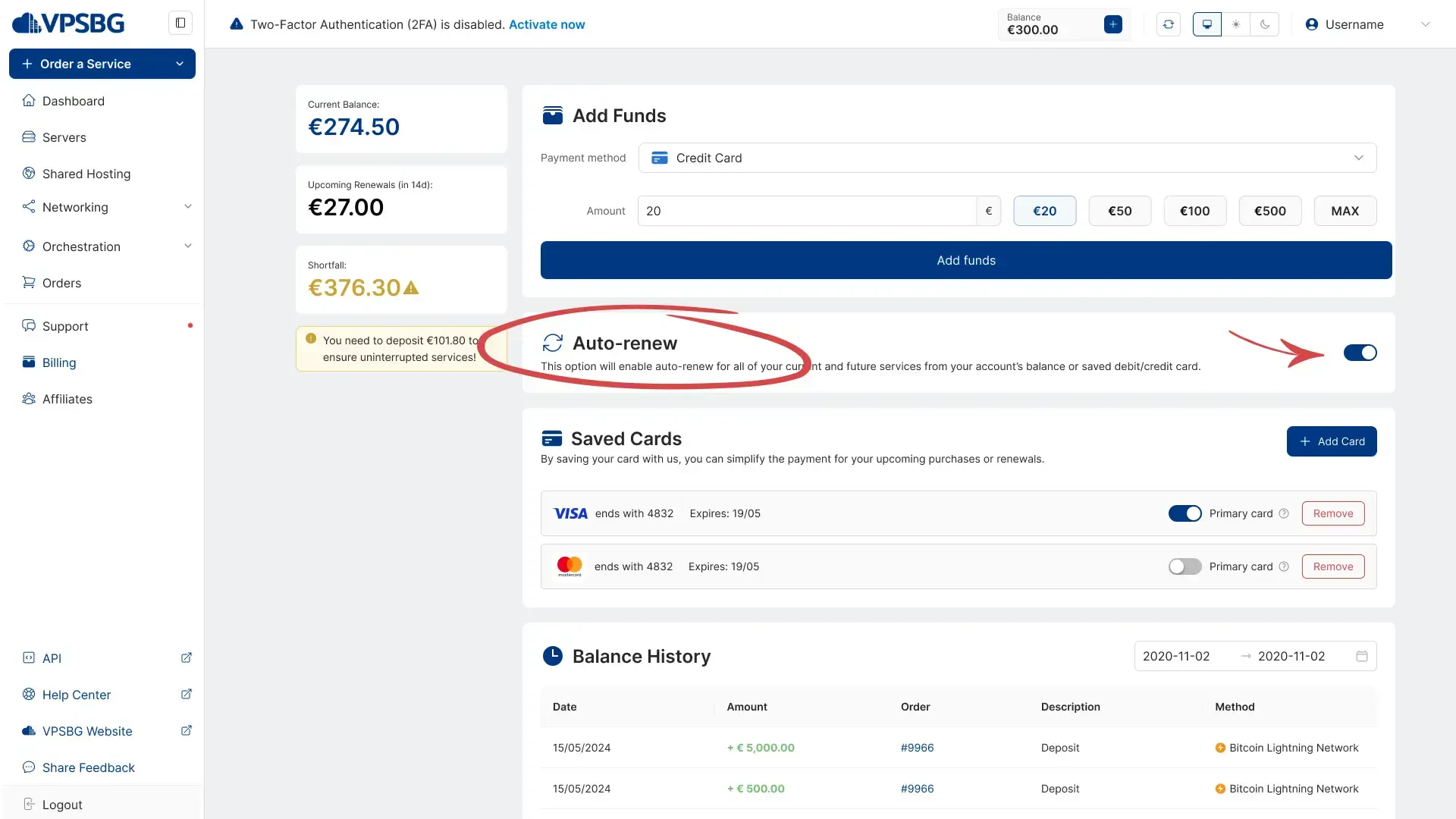
click the toggle

How to automatically renew your services by card

In order to save you time and effort, you can also save your card details in your account. By doing this, your card will be automatically charged each month for all of your active services, meaning that you will never have to worry about forgetting to renew a given service or running out of funds in your balance.

In order to activate the card auto-renew feature, you must first log into your account and then navigate to the 'Billing' tab as shown:
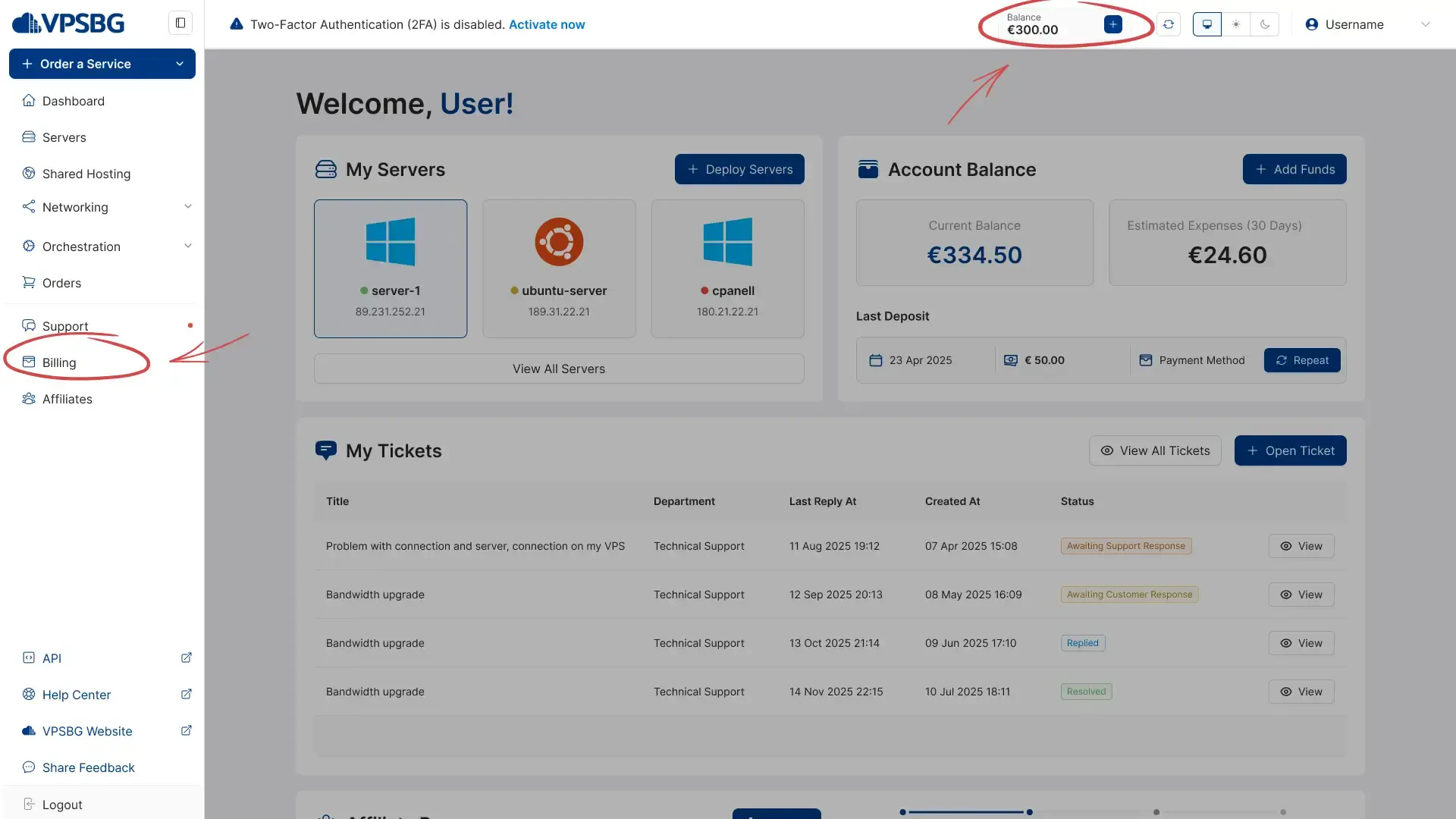
billing tab

Here, you will see the 'Saved Cards' section.
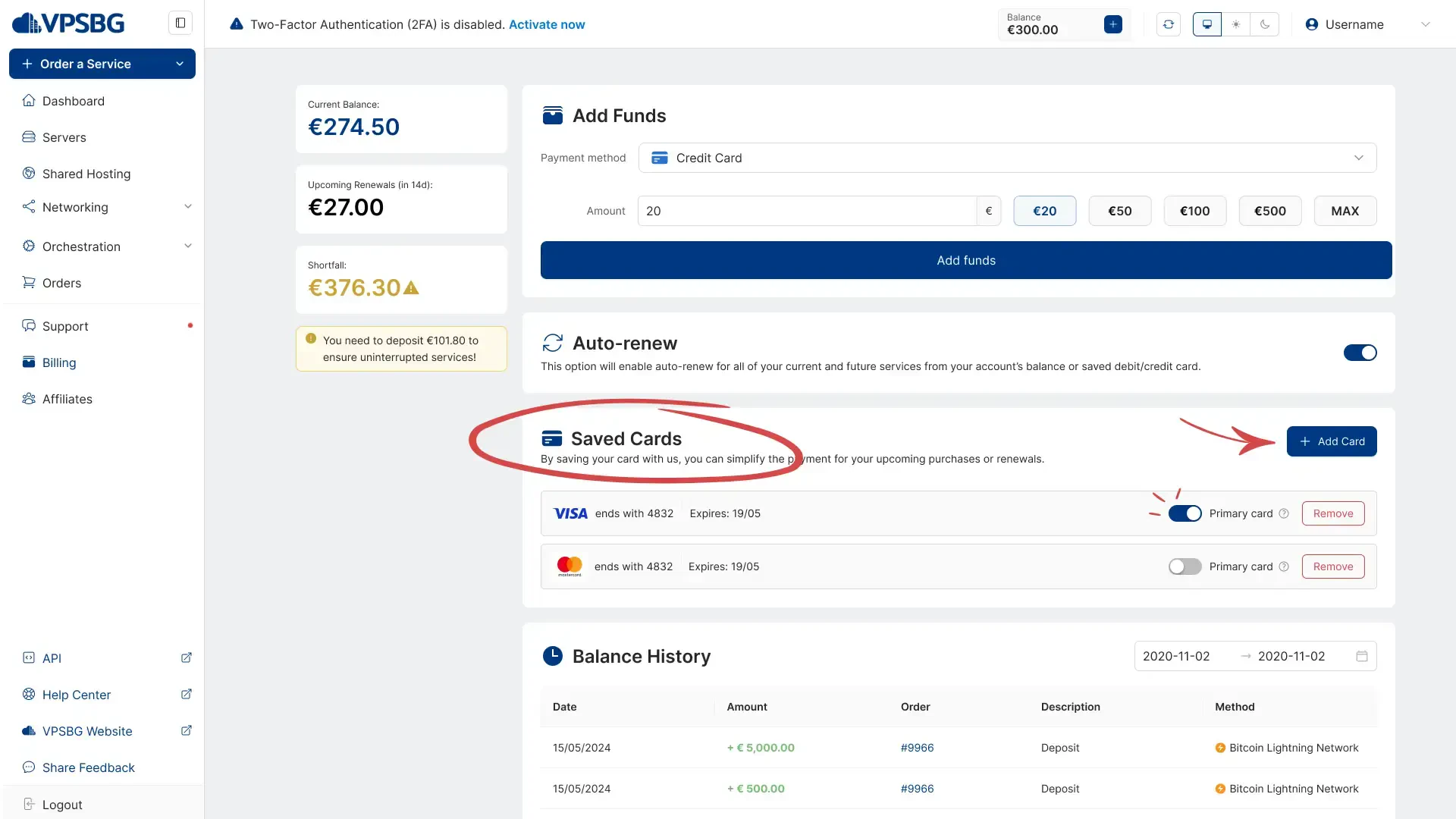
saved card

Next, click on the ‘Add Card’ button and simply enter your card details. It is important to note that your details are not saved on our servers, but rather with our trusted card payment processor - Stripe. You can save multiple cards and you also have the option to select which one is going to be your Primary card. We will always charge the Primary card first and if the payment doesn’t go through, we will charge other secondary cards.

Additionally, by adding and saving your card details, you can also purchase new services with 1 click.

IMPORTANT: Funds will be deducted from your balance first. When the funds in your balance have been expended, your card will be charged for the remainder of the payment.

IMPORTANT: Automatic payments depend on the expiry date of your services. For example, if you have multiple services that all expire within the same week, your card will be charged for all of them simultaneously, meaning that you will be making a single payment that will cover all services. If, however, your services’ expiry dates vary, then your card will be charged for each service individually.

If you encounter any problems, please do not hesitate to contact us.

Subscribe to Our Newsletter

Join 5000+ subscribers and receive helpful content, deals and more! We promise no spam - 100% great content. Unsubscribe anytime.

Share Article

Related Content

22 June 2023

VPSBG Software Licenses & Prices

We at VPSBG offer cheap software licenses for Windows Server, extra RDS seats and Microsoft Office 2021 Standard as an official SPLA partner.

#Article#VPSBG
16 January 2023

Accepted payment methods for our services

We at VPSBG offer a number of different payment methods for our services - Bitcoin, Lightning Network, credit card and bank transfer.

#Article#VPSBG
26 September 2022

How to pay for your server with Bitcoin

A step-by-step tutorial on how to pay for your server using Bitcoin. Pay for your servers securely and anonymously to protect your privacy.

#Tutorial#VPSBG

Need Help?

Couldn't find what you were looking for? Drop us a line or open a ticket directly and our support team will help you as soon as possible.

Contact UsOpen Ticket