NewExtra server protection with Measured Boot & UKI images.View Measured Boot
BlogDocumentationFAQNo Third-Party CookiesContact Us
  • Pricing
Log inSign up
Cloud VPSVDSMemory-Optimized VDSStorage-Optimized VDSWindows VPSBitcoin VPSDDoS ProtectionPrivate Networking (VPC)Floating IPsAdditional Server SupportMicrosoft LicensesDatacenterNetworkDocumentationFAQNo Third-Party CookiesConfidential ComputingSelf-Hosted VPNBlogAboutBrand GuidelinesAffiliatesContact UsLegal & Compliance

Products

  • Pricing
  • Cloud VPS
  • VDS
  • RAM-Optimized VDS
  • Storage-Optimized VDS
  • Windows VPS
  • Bitcoin VPS
  • DDoS Protection
  • Private Networking (VPC)
  • Floating IPs
  • Microsoft Licenses
  • Additional Server Support

Explore

  • Documentation
  • Developers API Docs
  • FAQ
  • Datacenter
  • Network
  • Looking Glass
  • Confidential Computing
  • Cookie Policy
  • Self-Hosted VPN

Company

  • Blog
  • Contact Us
  • About Us
  • Brand Guidelines
  • Affiliates

Legal & Compliance

  • Terms of Service
  • Privacy Policy
  • Data Processing Agreement
  • Acceptable Use Policy
  • Microsoft Software Terms of Use
  • Refund Policy
  • Report Abuse

Products

  • Cloud VPS
  • VDS
  • RAM-Optimized VDS
  • Storage-Optimized VDS
  • Windows VPS
  • Bitcoin VPS
  • DDoS Protection
  • Private Networking (VPC)
  • Floating IPs
  • Microsoft Licenses
  • Additional Server Support
Pricing

Explore

  • Documentation
  • Developers API Docs
  • FAQ
  • Datacenter
  • Network
  • Looking Glass
  • Confidential Computing
  • Cookie Policy
  • Self-Hosted VPN

Company

  • Blog
  • Contact Us
  • About Us
  • Brand Guidelines
  • Affiliates

Legal & Compliance

  • Terms of Service
  • Privacy Policy
  • Data Processing Agreement
  • Acceptable Use Policy
  • Microsoft Software Terms of Use
  • Refund Policy
  • Report Abuse

© VPS.BG Ltd. 2026 · All rights reserved!

Made with passion in Bulgaria · VAT ID: BG203144520

Contents

  • How to cancel a VPS or VDS service

Subscribe to Our Newsletter

Join 5000+ subscribers and receive helpful content, deals and more! We promise no spam - 100% great content. Unsubscribe anytime.

Share Article

#VPSBG
  1. Documentation
  2. /
  3. #VPSBG
  4. /
  5. How to cancel your service

How to cancel your service

Published: 04 February 2020 • Updated: 05 July 2026 • 1 min read

#Tutorial#VPSBG

We will be sad to see you cancel your cloud VPS or VDS service, but if you wish, you can easily cancel your service via the Console. Simply log into your VPSBG account and click on the 'Servers' tab from the menu on the left.

How to cancel a VPS or VDS service

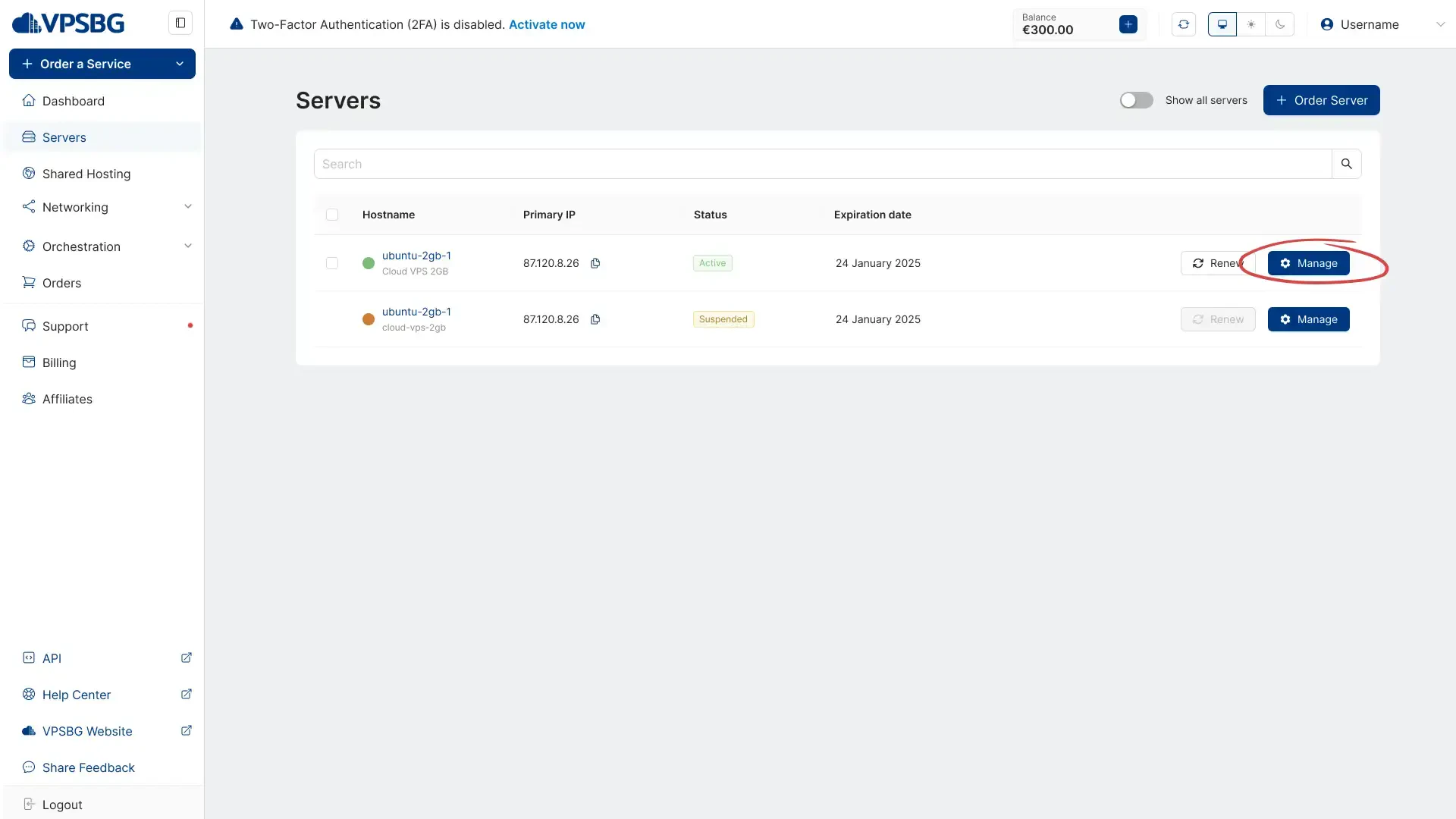
Firstly, click on the ‘Manage’ button of the server that you wish to cancel:
manage server

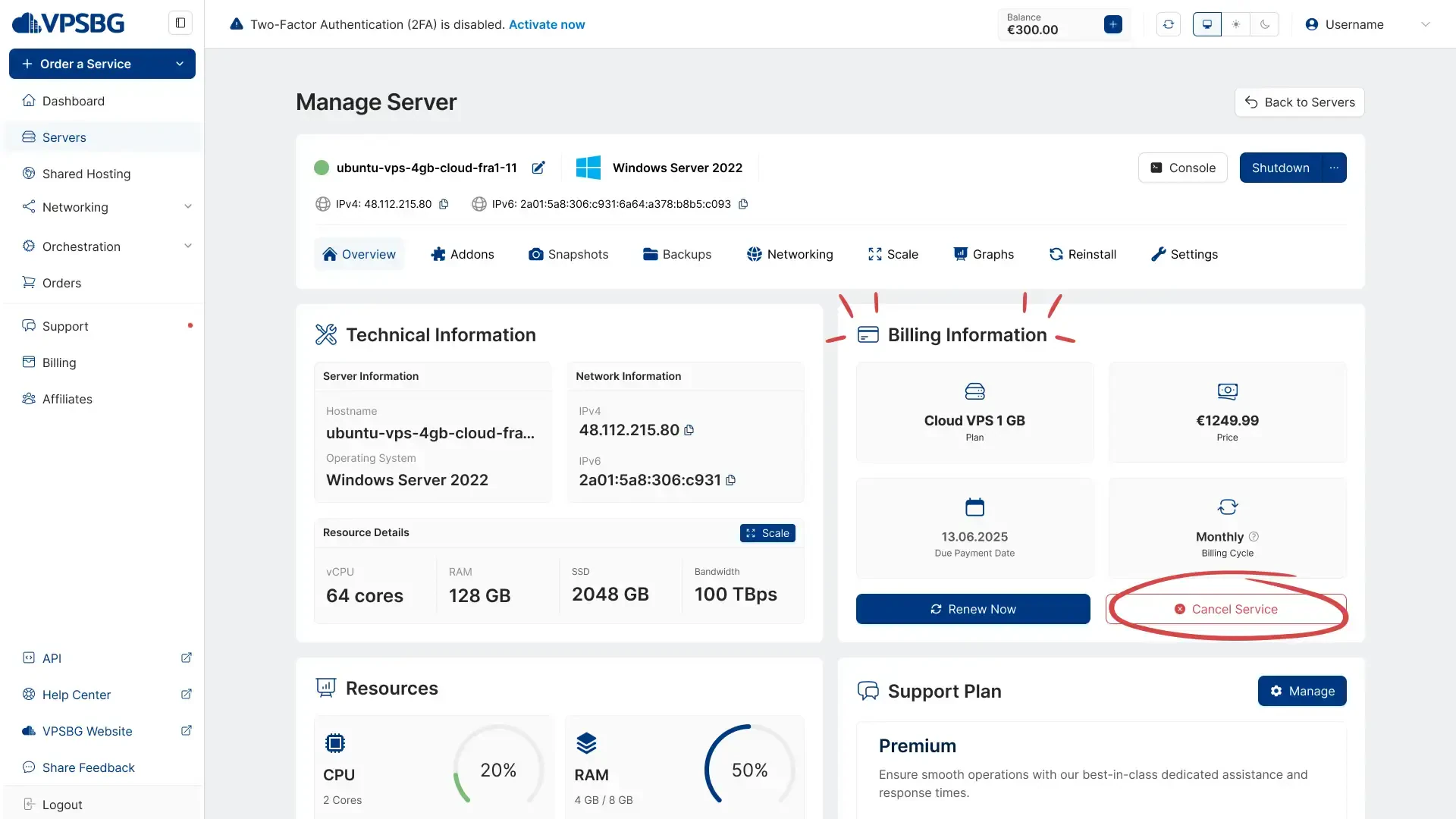
You will then be taken to the details page for the service. Here, in the 'Overview' tab, which is selected by default, you will find your server’s Billing Parameters in their own separate section. You will also see the 'Cancel Service' button:
cancel button

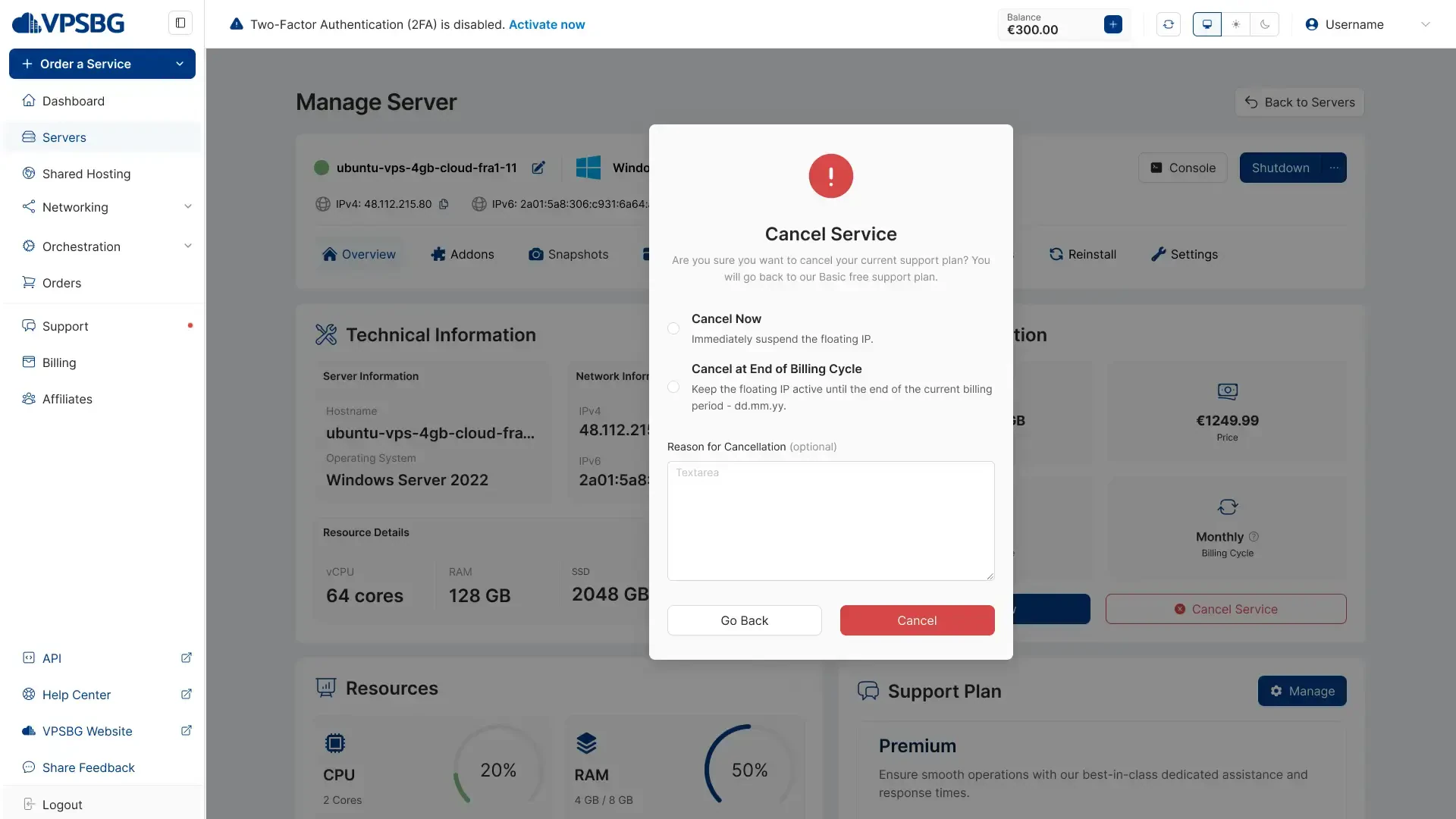
When you click the button, a confirmation screen will appear which will give you 2 options - to cancel your service immediately or to cancel your service at the end of its billing cycle. Simply select your desired option and click on the 'Cancel Server' button:
cancel service

IMPORTANT: If you select to immediately cancel your service, all of the data on the server will be permanently deleted. This is an irreversible process! Deleted data cannot be retrieved! Choosing the second option will allow you to undo your cancel request until the end of the server’s billing cycle. If you have multiple active services, make sure you cancel the correct one! If you are cancelling because your current server plan doesn't have enough resources, you can upgrade your server plan via the Scale tab instead.

If you encounter any issues while trying to cancel your service, please do not hesitate to contact us!

Subscribe to Our Newsletter

Join 5000+ subscribers and receive helpful content, deals and more! We promise no spam - 100% great content. Unsubscribe anytime.

Share Article

Related Content

26 September 2022

How to pay for your server with Bitcoin

A step-by-step tutorial on how to pay for your server using Bitcoin. Pay for your servers securely and anonymously to protect your privacy.

#Tutorial#VPSBG
16 January 2023

Accepted payment methods for our services

We at VPSBG offer a number of different payment methods for our services - Bitcoin, Lightning Network, credit card and bank transfer.

#Article#VPSBG
22 June 2023

VPSBG Software Licenses & Prices

We at VPSBG offer cheap software licenses for Windows Server, extra RDS seats and Microsoft Office 2021 Standard as an official SPLA partner.

#Article#VPSBG

Need Help?

Couldn't find what you were looking for? Drop us a line or open a ticket directly and our support team will help you as soon as possible.

Contact UsOpen Ticket