NewExtra server protection with Measured Boot & UKI images.View Measured Boot
BlogDocumentationFAQNo Third-Party CookiesContact Us
  • Pricing
Log inSign up
Cloud VPSVDSMemory-Optimized VDSStorage-Optimized VDSWindows VPSBitcoin VPSDDoS ProtectionPrivate Networking (VPC)Floating IPsAdditional Server SupportMicrosoft LicensesDatacenterNetworkDocumentationFAQNo Third-Party CookiesConfidential ComputingSelf-Hosted VPNBlogAboutBrand GuidelinesAffiliatesContact UsLegal & Compliance

Products

  • Pricing
  • Cloud VPS
  • VDS
  • RAM-Optimized VDS
  • Storage-Optimized VDS
  • Windows VPS
  • Bitcoin VPS
  • DDoS Protection
  • Private Networking (VPC)
  • Floating IPs
  • Microsoft Licenses
  • Additional Server Support

Explore

  • Documentation
  • Developers API Docs
  • FAQ
  • Datacenter
  • Network
  • Looking Glass
  • Confidential Computing
  • Cookie Policy
  • Self-Hosted VPN

Company

  • Blog
  • Contact Us
  • About Us
  • Brand Guidelines
  • Affiliates

Legal & Compliance

  • Terms of Service
  • Privacy Policy
  • Data Processing Agreement
  • Acceptable Use Policy
  • Microsoft Software Terms of Use
  • Refund Policy
  • Report Abuse

Products

  • Cloud VPS
  • VDS
  • RAM-Optimized VDS
  • Storage-Optimized VDS
  • Windows VPS
  • Bitcoin VPS
  • DDoS Protection
  • Private Networking (VPC)
  • Floating IPs
  • Microsoft Licenses
  • Additional Server Support
Pricing

Explore

  • Documentation
  • Developers API Docs
  • FAQ
  • Datacenter
  • Network
  • Looking Glass
  • Confidential Computing
  • Cookie Policy
  • Self-Hosted VPN

Company

  • Blog
  • Contact Us
  • About Us
  • Brand Guidelines
  • Affiliates

Legal & Compliance

  • Terms of Service
  • Privacy Policy
  • Data Processing Agreement
  • Acceptable Use Policy
  • Microsoft Software Terms of Use
  • Refund Policy
  • Report Abuse

© VPS.BG Ltd. 2026 · All rights reserved!

Made with passion in Bulgaria · VAT ID: BG203144520

Contents

  • What is a Floating IP exactly?
  • How to order a Floating IP?

Subscribe to Our Newsletter

Join 5000+ subscribers and receive helpful content, deals and more! We promise no spam - 100% great content. Unsubscribe anytime.

Share Article

#Tutorial
  1. Documentation
  2. /
  3. #Tutorial
  4. /
  5. What is Floating IP and how to order it?

What is Floating IP and how to order it?

Published: 19 April 2021 • Updated: 13 February 2026 • 3 min read

#Tutorial#VPSBG#IP Management

In this documentation entry, we will discuss in detail what a floating IP actually is and how it can be useful for your business. We are also going to look at how you can order the service using our console. So without any more waiting, let’s dive right in!

What is a Floating IP exactly?

Simply said, a floating IP is a publicly accessible IP address that can be easily transferred from one of your servers to another in a matter of seconds.

If you are switching between KVM VPS or Dedicated Instances you will be required to reboot the server when you attach to, or detach an IP address from it. This is to ensure that all of the changes are applied.

One of the main purposes of using floating IPs is that they can help minimize downtime significantly while also creating a highly available infrastructure. This can happen effortlessly as you can just transfer a given IP address from your main server to your backup server, allowing your business to continue running. This is extremely useful when you have to deal with scheduled or unpredictable downtime, which can be caused by routine maintenance or even hackers that are trying to take your website (or even server) down using DDoS or other types of cyberattacks. 

However, as we mentioned in our floating IP announcement, we also offer DDoS-protected floating IPs, which are designed to completely mitigate any large volumetric attacks, while protecting your servers at all times. In addition to our traditional floating IPs, these DDoS-protected services come with a plethora of different customization options and monitoring tools, allowing you to set geo-filters, blacklist IPs and much more so that you can be in full control of your servers.

How to order a Floating IP?

You can easily order a floating IP through the console. Simply follow these steps.

Firstly, click on the ‘New Service’ button as shown in the following image:
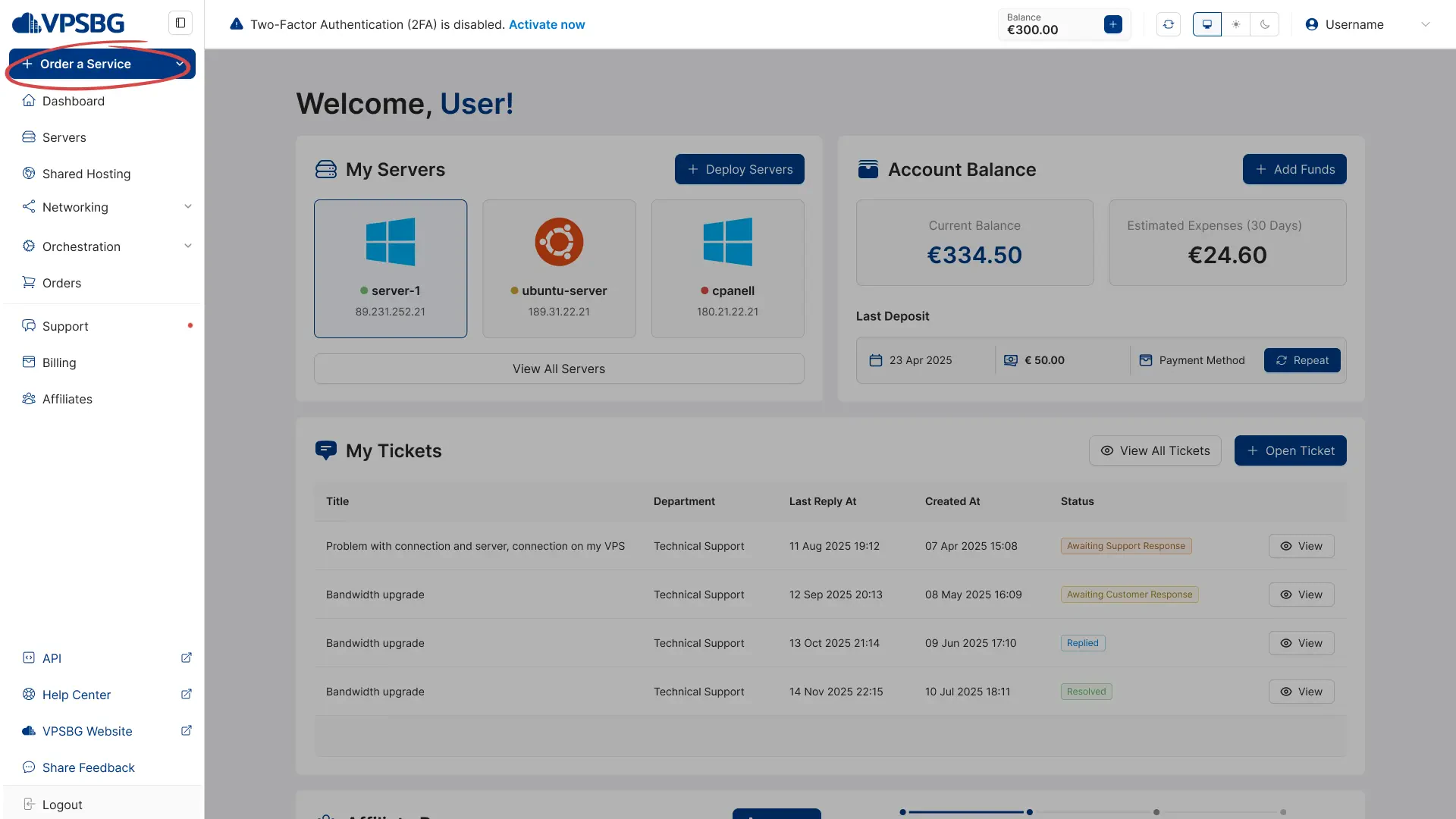
new service

Next, click on ‘Order Floating IPs’, as illustrated below:
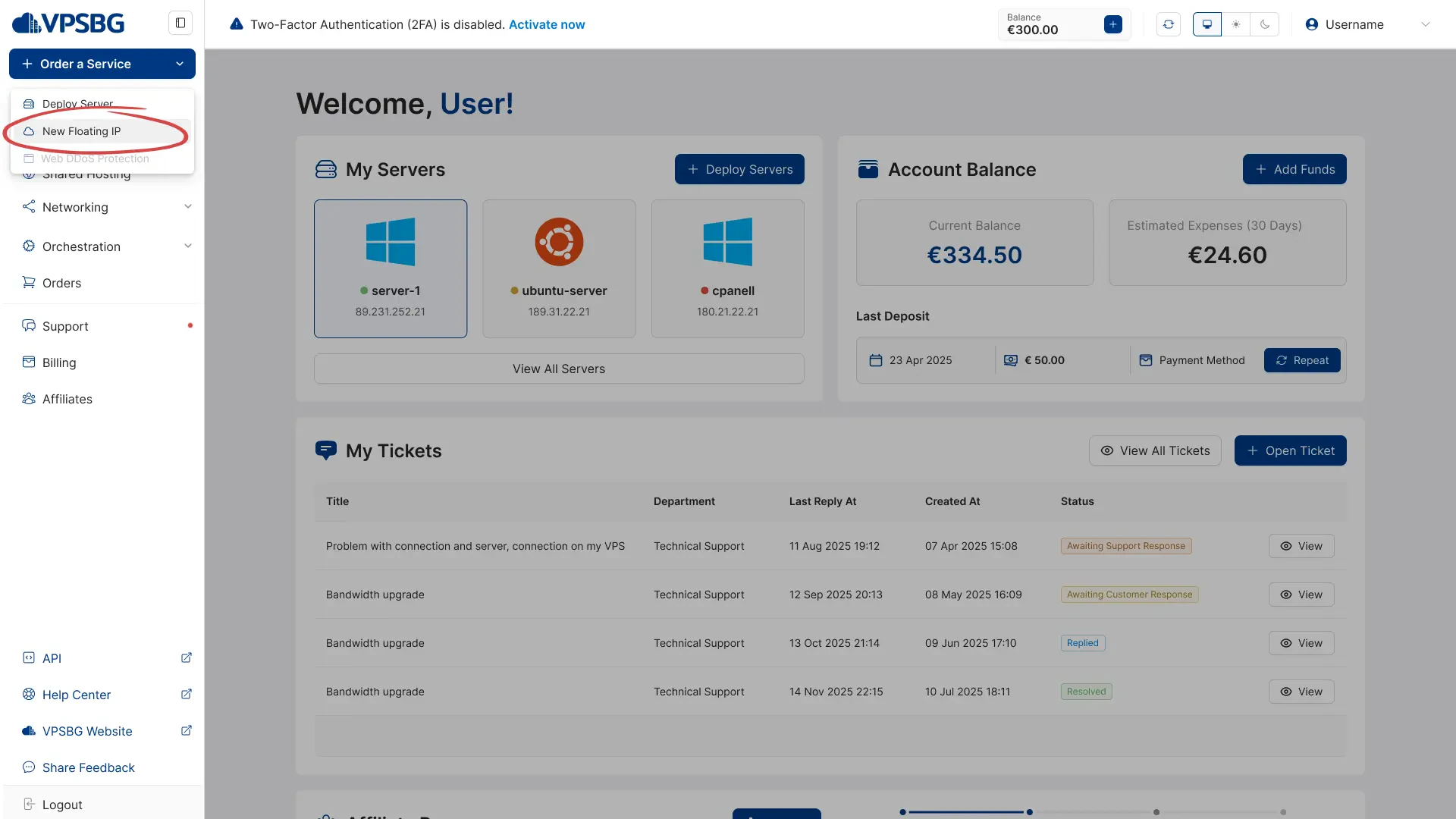
order floating ips

You will now see the following screen, which will allow you to select the amount of floating IPs and DDoS-protected floating IPs that you would like to order:

choose amount

IMPORTANT: Our traditional and DDoS-protected floating IPs have a combined total cap of 5. This means that if you get 4 floating IPs, you will only be able to get 1 DDoS-protected floating IP. If you wish to extend this limit, please contact us.

Once you have selected the number of IPs that you’d like, you have the option to immediately attach them to a given server by selecting one from the dropdown:

attach to server

If you do attach the floating IPs, their billing cycle will be automatically synced with the billing cycle of the designated server. If you decide to not attach your floating IPs during purchase, you will have the option to manually select a billing cycle for your IPs.

That's it. If you have any questions regarding operating your floating IPs, you can read through our documentation entry on how to manage your floating IPs.

Subscribe to Our Newsletter

Join 5000+ subscribers and receive helpful content, deals and more! We promise no spam - 100% great content. Unsubscribe anytime.

Share Article

Related Content

16 January 2023

Accepted payment methods for our services

We at VPSBG offer a number of different payment methods for our services - Bitcoin, Lightning Network, credit card and bank transfer.

#Article#VPSBG
26 September 2022

How to pay for your server with Bitcoin

A step-by-step tutorial on how to pay for your server using Bitcoin. Pay for your servers securely and anonymously to protect your privacy.

#Tutorial#VPSBG
28 April 2026

How to create and manage a VPC

Learn how to create a VPC using the VPSBG Console and start utilizing private networking for greater communication security and privacy.

#IP Management#Tutorial
23 September 2025

How to manage a DDoS-protected Floating IP

Learn more about our DDoS-protected floating IPs. A detailed tutorial on how to order, manage and set up everything to match your needs!

#Tutorial#IP Management#VPSBG

Need Help?

Couldn't find what you were looking for? Drop us a line or open a ticket directly and our support team will help you as soon as possible.

Contact UsOpen Ticket